
🤖 For Android Users
Follow these steps to add a shortcut to your Android home screen. The instructions below cover Chrome and Firefox, but most other browsers use a very similar process.
Chrome on Android
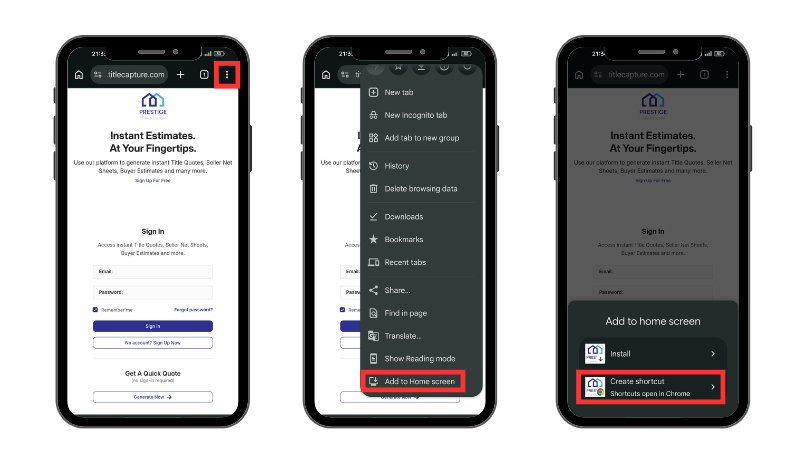
1. Open Chrome and go to the website — for example, yourtitlecompany.titlecapture.com
2. Tap the Menu icon (three vertical dots) next to the address bar.
3. Tap on Add to Home screen — you might need to scroll down to see it — and pick Create shortcut.
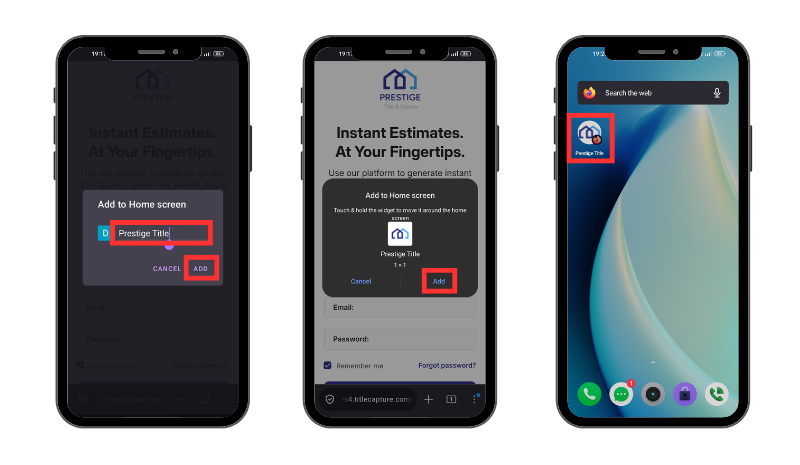
4. Give your shortcut a name and tap Add. The shortcut will then appear on your home screen.
Why not an Play Store app?
We get this question a lot — here’s why a home screen shortcut is the smarter choice:
Instant Access, No Downloads Skip the hassle of searching, downloading, and installing. Just add the shortcut and you’re ready to go.
Always Up to Date Native apps require periodic updates. With web access, you’re automatically on the latest version every time you open it.
Live, Accurate Data TitleCapture updates in real time, so your rates, fees, and calculations are always current—no waiting for syncs or patches.
With TitleCapture’s home screen shortcut, you’re literally one tap away from getting estimates done—fast, simple, and accurate. 😃👍
Need Help? Our friendly support team is just a message away. If you have questions or run into any issues, email us anytime at [email protected].